
Terramar Brands USA
TerramarBrandsBeauty
4.720.00 Reviews
- Version
- 2.3.0
- Installs
- 10.00K
- Age Rating
- Everyone
Screenshots


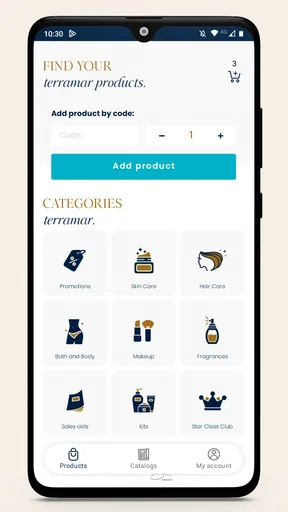
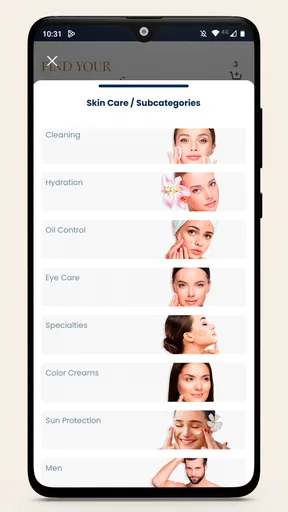
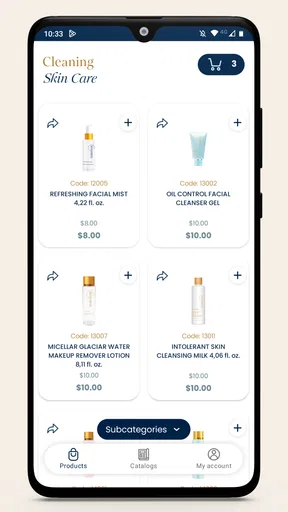

Our Review of Terramar Brands USA
 Analysis by Appyee
Terramar Brands USA is a free beauty shopping app from TerramarBrands, built around browsing products and placing them into a shopping cart. I approached it as a first-time customer rather than as someone already familiar with the brand, and that distinction matters: the app is most useful when I already know I want to explore Terramar products, not when I am looking for a broad beauty marketplace with many unrelated brands.
The experience is straightforward at its core. I can open the catalog, look through available beauty items, choose something that interests me, and use the cart to keep track of a possible order. That simple path makes the app approachable, especially for someone who prefers shopping from a phone instead of moving between a mobile browser and several product pages.
TerramarBrands has positioned this as a focused brand app rather than a general-purpose beauty retailer. That gives it a clear identity, but it also sets expectations. The value comes from having Terramar’s shopping experience in one place; the app is not trying to replace every beauty store or provide the widest possible comparison of competing products.
What the first visit feels like
On my first visit, I would treat the app as a digital storefront. The central question is not whether it contains every tool found in a large retail platform, but whether it makes it easy to move from curiosity to a considered cart. For that purpose, the shopping-cart focus is important. It gives me a place to collect products while I decide, instead of forcing an immediate commitment after every item I inspect.
The app is listed in the Beauty category and is suitable for Everyone, so it is presented as an accessible shopping experience rather than an age-restricted service. It is free to install, which removes the first barrier for a curious shopper. I can try the app without paying for the app itself, then decide whether the products and shopping process are relevant to me.
One useful way to approach the catalog is to separate browsing from buying. I would first look at the range of items and note which products fit an actual need, such as replacing a regularly used beauty item or preparing a small personal-care order. Only after that would I use the cart as a shortlist. This prevents the common mistake of treating every interesting product as an immediate purchase.
The app has reached more than ten thousand installs and holds a 4.7 average from 58 ratings, with 20 written reviews. Those figures suggest that it has found a positive audience, although I would still judge it against my own shopping habits. A high average can tell me that many users are satisfied, but it cannot decide whether a focused brand catalog is enough for the particular product comparison I want to make.
Getting ready without overcomplicating the process
My advice for a first-time user is to begin with a clear purpose. If I want to browse casually, I keep the first session short and learn how products are organized. If I already have a Terramar item in mind, I search or browse with that item as the destination. This small change makes the app feel more efficient because I am not expecting it to behave like a beauty magazine, a review community, and a retailer all at once.
I would also keep the product decision separate from the cart decision. The cart is useful for gathering choices, but adding an item does not automatically mean it is the best option for me. I can use it as a temporary holding area while checking the product information available inside the app and considering whether I genuinely need the item. For beauty shopping, that pause is valuable because attractive packaging or a familiar product name can otherwise encourage impulse purchases.
The current version is 2.3.0, and the app supports devices running Android 5.0 or later. That broad operating-system requirement should make it approachable for people using older Android hardware, though the quality of the experience can still depend on the phone itself, its screen, and how comfortably the catalog displays on that device.
There is no reason to install it expecting a paid subscription simply to access the app. Its listed price is free. The more relevant question is whether Terramar’s product selection suits me and whether I prefer a dedicated brand storefront over a browser or a multi-brand shopping app.
From installation to the first meaningful result
My first meaningful success would be creating a sensible cart, not merely opening the app. I would browse until I found one product that matches a real need, inspect the information presented for it, and add it to the cart. Then I would continue only if I had a genuine reason to consider another item. This produces a useful result quickly: I know whether the app can help me assemble a Terramar order without wandering through unrelated content.
A realistic everyday example would be preparing a personal-care restock before the products I already use run out. I could open Terramar Brands USA while making a short list, find the relevant items, place possible choices in the cart, and review that collection before deciding what belongs in the final order. The advantage is not dramatic automation; it is having a dedicated place to organize the shopping task from a phone.
Another practical use is planning a gift. Rather than buying the first beauty product that appears in a general marketplace, I could browse Terramar’s own selection and use the cart to compare a few possible choices. I would still need to think about the recipient’s preferences, but the app can reduce the clutter that comes from searching across unrelated retailers.
This cart-first workflow is one of the app’s more useful qualities. It turns browsing into a staged decision: discover a product, collect it, reconsider it, and then proceed. For someone who tends to shop quickly on a mobile browser, that extra pause can make the purchase feel more deliberate.
The best first-session goal is a useful shortlist, not a rushed checkout. That approach also makes it easier to notice how much product context the app gives me. If I need extensive ingredient research, independent reviews, shade comparisons, or cross-brand price checking, I would expect to use another source alongside it rather than assuming a single brand app will answer every question.
Where first-time shoppers may hesitate
The most likely confusion comes from the difference between a shopping cart and a completed order. Seeing an item in the cart means I have collected it for consideration; it should not be treated as proof that I have finished buying it. I would review the cart carefully before moving forward, especially if I have added products during several separate browsing sessions.
A second point of friction is scope. The store summary describes a Terramar Brands app with a shopping cart, while the short description identifies it as Terramar Brands USA. That tells me to expect a brand-specific shopping destination. If I open it hoping to compare Terramar with many competing beauty labels, I may find the experience narrower than expected. That is not necessarily a flaw, but it is an important distinction before installation.
I would also avoid assuming that the app itself replaces product research. A dedicated storefront is convenient for discovering and collecting Terramar items, but a careful shopper may still want to consider personal preferences, existing routines, and information from other sources. The app’s strongest job is organizing the brand-shopping path; it is not automatically the final authority for every beauty decision.
Another realistic limitation is that a focused catalog can feel less useful when I do not already have a Terramar product in mind. In a large beauty marketplace, I can begin with a need such as skincare, fragrance, or body care and compare numerous brands. Here, the experience makes more sense when the brand itself is part of my starting point.
How it compares with ordinary alternatives
The usual alternative is a mobile browser. A browser gives me flexibility: I can search broadly, open independent reviews, compare retailers, and move between brands. That is better when research and price comparison are my priority. The dedicated app is more appealing when I want a focused Terramar browsing experience and a cart that keeps the shopping task together.
A second alternative is a large multi-brand beauty app. Such services generally win on selection and comparison. They are useful for shoppers who want to evaluate several brands at once or combine products from different companies in one session. Terramar Brands USA has a different advantage: it keeps my attention on Terramar’s own range, which can make the experience less distracting when I have already chosen the brand.
There is also a difference between a brand app and a retailer’s loyalty app. A retailer may offer broader order history, store-specific tools, or a wider range of purchasing options. I would choose Terramar’s app when the brand catalog is exactly what I want, not because I expect the same breadth as a major retail platform.
In practical terms, I would use the app for discovery and cart building, then use my normal judgment before completing a purchase. That combination is stronger than treating the app as a complete replacement for every other shopping tool. It lets the dedicated storefront do what it is good at while preserving the broader comparison that a browser or multi-brand service handles better.
Small habits that make the app more useful
My first tip is to build the cart in two passes. During the first pass, I add only products that clearly match my purpose. After a short break, I review the cart and remove anything that was added merely because it looked interesting. This is especially helpful in beauty shopping, where browsing can easily become more expansive than the original need.
My second tip is to use the cart as a planning tool for repeat purchases. If I am approaching the end of a product I already use, I can begin assembling the next order before I run out. That reduces the pressure of making a rushed decision. It also gives me a chance to reconsider whether I want the same item or whether my routine has changed.
My third tip is to separate gift browsing from personal restocking. I would not mix both purposes in one cart unless I am very organized, because the products may have different reasons for being there. Keeping a clear mental label for each shopping task makes the final review easier and reduces the chance of overlooking an item or buying something without a clear recipient in mind.
A fourth useful habit is to test the app on the device I actually use for shopping. The Android requirement reaches back to version 5.0, but an older phone may still make detailed browsing less comfortable than a newer screen. If reading product information feels cramped, I would switch to a larger device or browser for research and return to the app for focused cart work.
Who should use it and who should skip it
I would recommend Terramar Brands USA to someone who already likes Terramar, wants a direct way to browse the brand’s beauty products, and appreciates keeping possible purchases in a mobile cart. It is also a reasonable choice for a first-time Terramar shopper who wants to explore without paying to install the app and prefers a focused storefront to a crowded marketplace.
I would be more cautious about recommending it to someone whose main goal is comparing many brands, checking a wide range of independent opinions, or building one order from several retailers. That shopper will probably be better served by a browser or broad beauty marketplace. The same applies to anyone who expects extensive beauty education, advanced personalization, or a large social community inside the shopping experience.
The app’s positive rating, free availability, and focused purpose make it easy to try. Still, I would not install it solely because it is popular. I would install it because Terramar products are relevant to my routine or because I want a dedicated place to explore that brand. The narrower the shopping goal, the more sense the app makes.
My final take after using the shopping flow
Terramar Brands USA succeeds by keeping its purpose clear. It is a beauty shopping app from TerramarBrands, centered on browsing the brand and managing possible purchases through a cart. I found that simplicity reassuring for a first visit: I did not need to learn a complicated system before reaching the useful part of the experience.
Its limitations are tied to the same focus that makes it approachable. It is not the strongest choice for broad market research, multi-brand comparison, or shoppers who want every beauty service gathered into one platform. I would pair it with a browser when I need wider research, then return to the app when I am ready to organize Terramar choices.
For a first-time user, the clearest path is simple: install the free app, browse with one real shopping goal, add a carefully chosen item to the cart, and review the shortlist before deciding what to do next. That workflow gives the app a fair test without creating unnecessary expectations. If Terramar is already part of your beauty routine, this focused storefront is worth trying as a practical companion for browsing and cart planning.
Overall, I see Terramar Brands USA as a useful, brand-specific shopping tool rather than an all-purpose beauty destination. Its 4.7 average and growing install base make it inviting to try, while its focused catalog tells me exactly when it will be most valuable: when I want Terramar products, a calmer shopping path, and a straightforward way to keep my choices together.
Verdict
Strengths of Terramar Brands USA
- Offers a wide range of branded lifestyle products in one place.
- Useful for shoppers looking for official Terramar USA merchandise.
- Product categories make browsing relatively straightforward.
- May provide access to brand-specific deals and promotions.
- Convenient option for checking products from a mobile device.
Limitations of Terramar Brands USA
- Product availability may vary depending on location and current stock.
- Some items may be priced higher than comparable alternatives.
- The app’s usefulness depends heavily on the size of its catalog.
- Shipping times and costs may differ by destination.
- Customer support response times may not always be immediate.
Similar Picks in This Category
View All
Beauty Makeup Editor & Camera
Photo & Video Editors - Instant Solution4.7

Perfect365: Face Makeup Editor
Perfect365, Inc.3.5

Mirror Plus - HD Mirror app
Digitalchemy, LLC4.8

Cute Lock Screen & Wallpapers
Prometheus Interactive LLC4.6

HD Camera for Android
One Music Player4.5

Phone Mirror app - True Mirror
Cards4.6
Frequently Asked Questions
What is Terramar Brands USA, and what can I do with the app?
Terramar Brands USA is designed to give customers access to the brand’s products, shopping information, and account-related features in one place. Depending on the current version and your location, you may be able to browse available items, review product details, manage orders, check promotions, and contact customer support. Before downloading, verify that the app is officially published by Terramar Brands or its authorized developer.
Is Terramar Brands USA available for both Android and iPhone?
Availability may vary according to your device, operating-system version, and country or region. Check the official Google Play Store or Apple App Store listing before installing, and compare the developer name, logo, screenshots, and privacy information with Terramar’s official website. If the application does not appear in your local store, it may not currently support your market or device.
Does Terramar Brands USA require an account or personal information?
Some features may be available without signing in, such as viewing general product information, while purchasing, order tracking, saved preferences, or customer-service functions may require an account. During registration or checkout, the app could request details such as your name, email address, delivery information, and payment data. Review the privacy policy and permissions before submitting personal information.
Can I place orders and make payments through Terramar Brands USA?
If shopping and checkout are enabled in your version of Terramar Brands USA, you may be able to select products, add them to a cart, choose delivery options, and complete payment through the app. Available payment methods, shipping areas, taxes, returns, and delivery times can differ by country. Always confirm the final order total and use only the official application.
Is Terramar Brands USA free to download, and are there any important safety considerations?
The app may be free to download, although products, shipping, or other optional services can involve charges. Download it only from an official app store rather than an unknown APK or unofficial website. Check the requested permissions, developer details, update history, user reviews, and privacy policy. Avoid sharing passwords or payment information if the app’s authenticity cannot be confirmed.
